When It Reloads

Running test commands when the elements refresh.

Have you ever encountered end-to-end test error "... failed because the page updated as a result of this command, but you tried to continue the command chain. The subject is no longer attached to the DOM"?
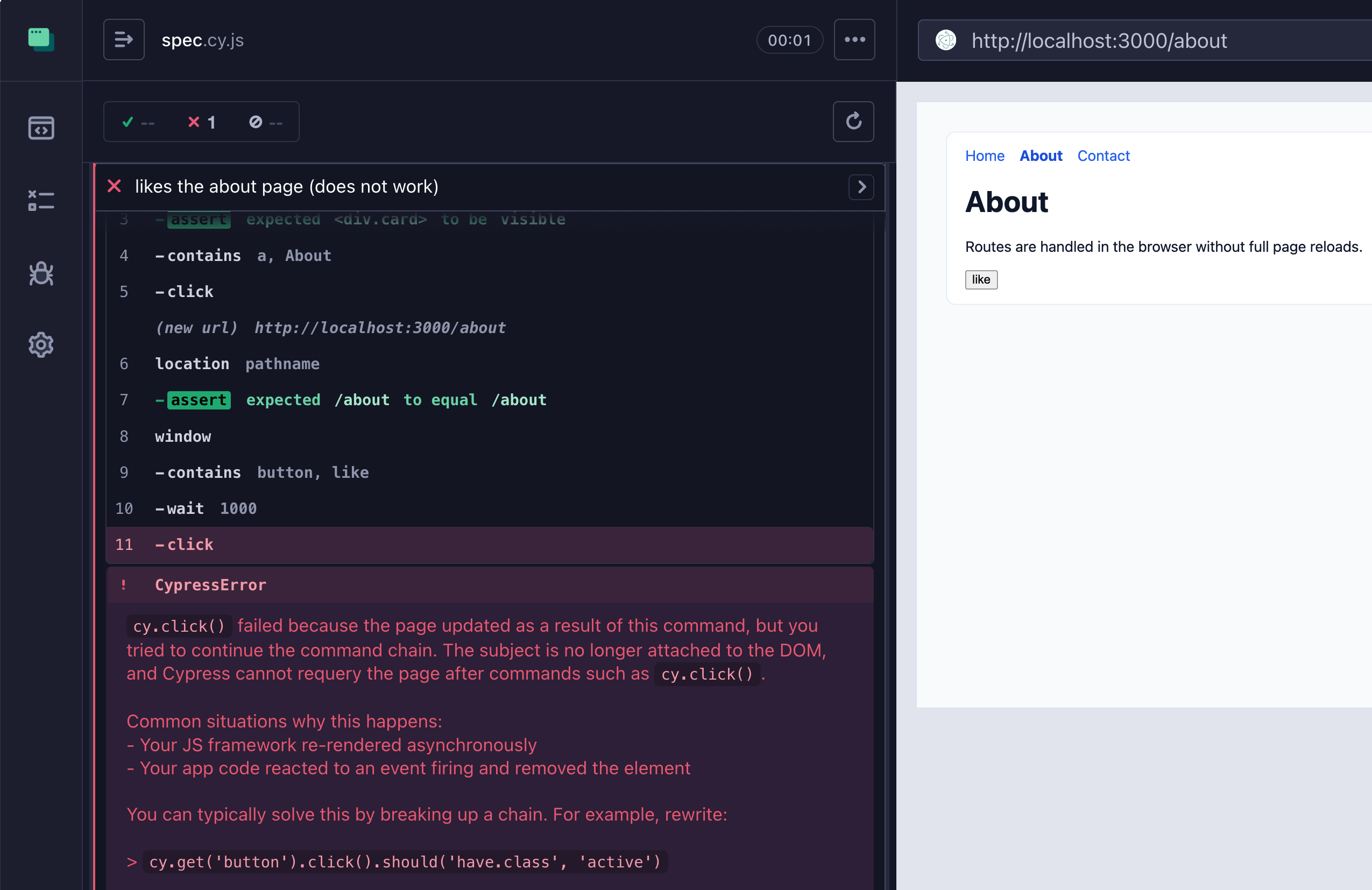
The page reloads error

The example above shows the test trying to click on the button, yet the command fails.

1
2
3
4
// the failing / flaky test
cy.contains('a', 'About').click()
cy.location('pathname').should('equal', '/about')
cy.contains('button', 'like').wait(1000).click()

This blog post shows when it happens and how to prevent it.

🎁 The demo application for this blog post can be found in the repo bahmutov/delayed-reload.

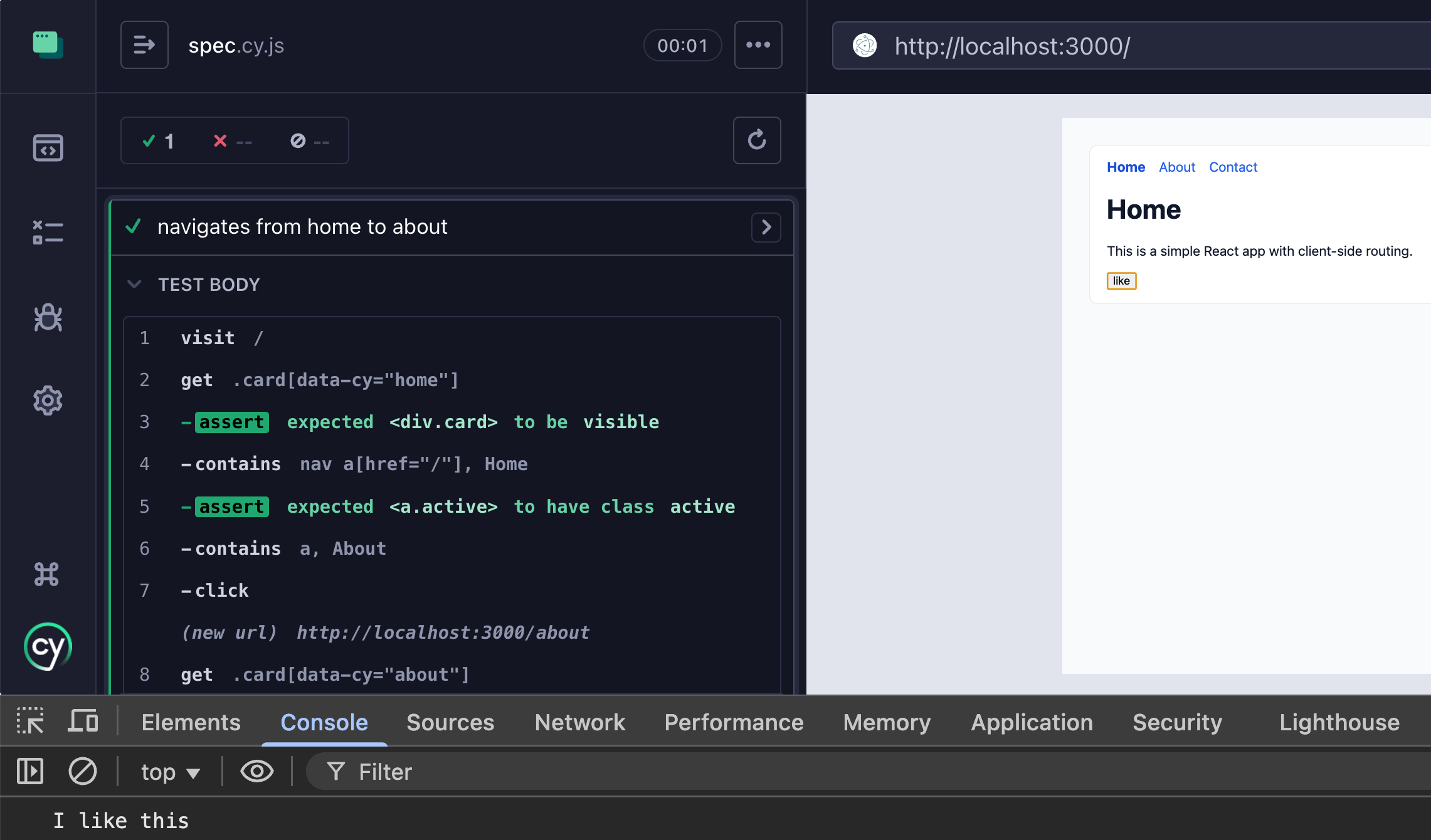
The navigation test

Imagine a client-side rendering that refreshes the elements based on the current route. We can confirm the app navigates correctly by checking the currently rendered card.

1
2
3
4
5
6
7
8
9
10
11
12
13
14
15
16
17
18
19
it.only('navigates from home to about', () => {
cy.visit('/')
cy.get('.card[data-cy="home"]').should('be.visible')
cy.contains('nav a[href="/"]', 'Home').should(
'have.class',
'active',
)

cy.contains('a', 'About').click()
cy.get('.card[data-cy="about"]').should('be.visible')
cy.contains('nav a[href="/about"]', 'About').should(
'have.class',
'active',
)
cy.contains('nav a[href="/"]', 'Home').should(
'not.have.class',
'active',
)
})

I specifically slowed down route navigation by 1 second to make the application behavior clear.

The button click test

On each page the user can click the "Like" button which prints a message to the console log.
The user clicked the Like button

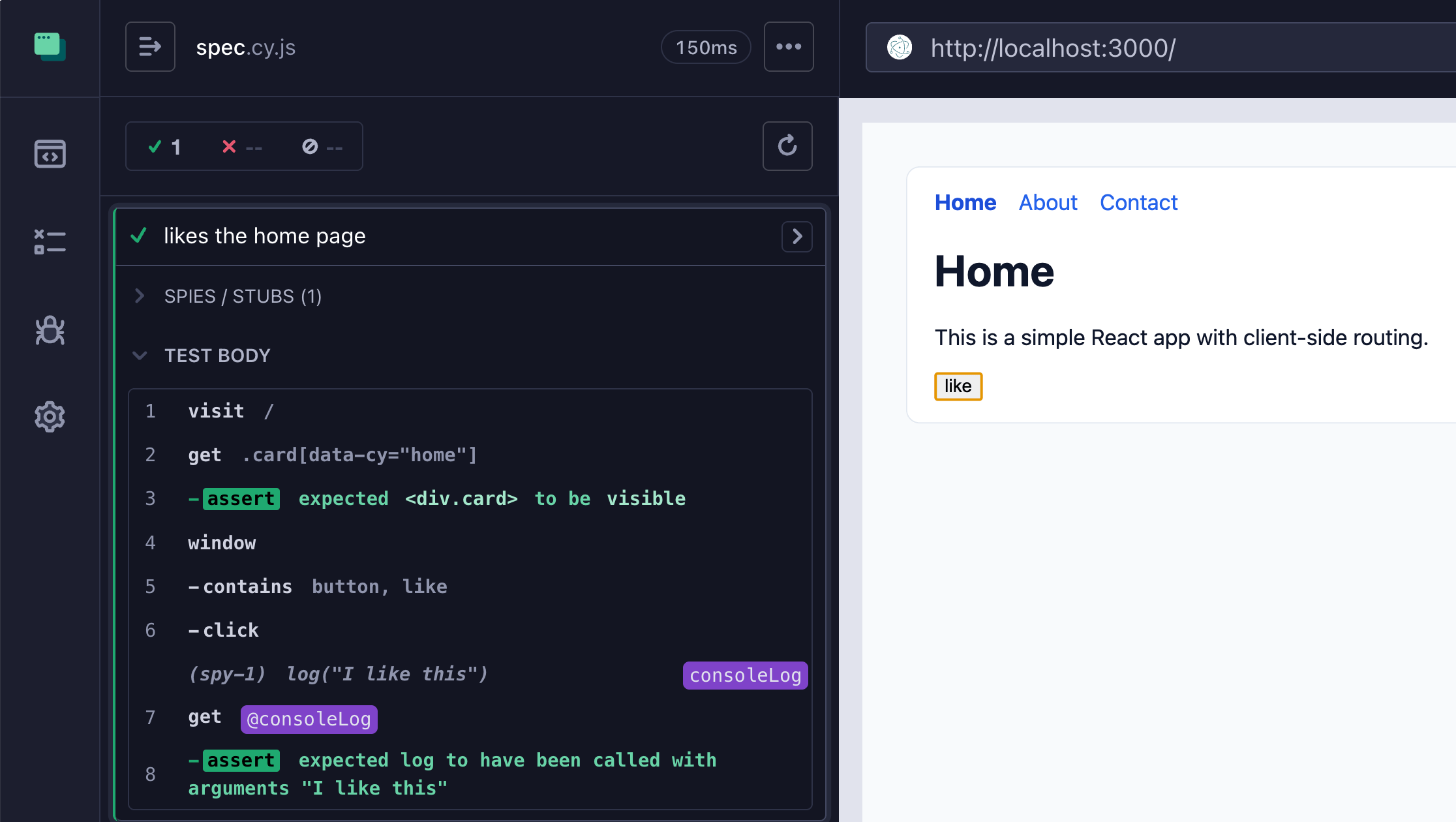
The "Home" component prints the "I like this" message, the "About" component prints "I like this about page" message. Let's verify the "Home" page works.

1
2
3
4
5
6
7
8
9
10
it('likes the home page', () => {
cy.visit('/')
cy.get('.card[data-cy="home"]').should('be.visible')

cy.window().then((win) => {
cy.spy(win.console, 'log').as('consoleLog')
})
cy.contains('button', 'like').click()
cy.get('@consoleLog').should('have.been.calledWith', 'I like this')
})

Testing the Like button click on the Home page

Navigation and click test

Let's write a test for "About" component and its "Like" button. We get to the "Home" page, navigate to the "About" page, and press "Like". Sounds easy.

1
2
3
4
5
6
7
8
9
10
11
12
13
14
15
it('likes the about page (does not work)', () => {
cy.visit('/')
cy.get('.card[data-cy="home"]').should('be.visible')
cy.contains('a', 'About').click()
cy.location('pathname').should('equal', '/about')

cy.window().then((win) => {
cy.spy(win.console, 'log').as('consoleLog')
})
cy.contains('button', 'like').wait(1000).click()
cy.get('@consoleLog').should(
'have.been.calledWith',
'I like this about page',
)
})

Hmm, the test fails.

The test does make sense: click on the "About" link, wait for the location to be "/about", then find the "Like" button and click on it. Yet Cypress complains that the "click" command failed because the "Like" button ... detaches from DOM? How can this be?

Look at the video closely. Notice that the URL part changes to "/about" immediately after the cy.contains('a', 'About').click() commands. Yet the component does not refresh instantly. Instead, you still see the old "Home" component. The navigation and refresh is delayed. We cannot simply rely on the following assertion to detect when the application finishes reloading a page or part of it

1
2
// NOT ENOUGH TO CHECK
cy.location('pathname').should('equal', '/about')

If the old page is still visible, finding the "Like" button is dangerous - we might find the "Like" button from the old page and try pressing it. But that button is gone by this point and Cypress correctly fails the test.

Fixing the test

There are several solutions to the problem. The easiest and clearest code would confirm the page has finished loading and rendering in response to the navigation before finding the "Like" button.

1
2
3
4
5
6
7
8
9
10
11
12
13
14
15
16
17
it('likes the about page (fixed)', () => {
cy.visit('/')
cy.get('.card[data-cy="home"]').should('be.visible')
cy.contains('a', 'About').click()
cy.location('pathname').should('equal', '/about')
// confirm the page has finished loading
cy.get('.card[data-cy="about"]').should('be.visible')

cy.window().then((win) => {
cy.spy(win.console, 'log').as('consoleLog')
})
cy.contains('button', 'like').wait(1000).click()
cy.get('@consoleLog').should(
'have.been.calledWith',
'I like this about page',
)
})

Here is how it works - notice that the test retries until the "About" component is visible before finding the "Like" button.

So my advice is to not simply rely on cy.location(...).should(...) assertions and instead check the DOM before proceeding.

Element reloads fix

There is another way to fix the test. We can check if the "card" element changes in response to the navigation. Since we will compare the element references (old and new), we need to "prepare" before clicking. Here is one possible implementation

1
2
3
4
5
6
7
8
9
10
11
12
13
14
15
16
17
18
19
20
21
22
23
24
25
26
27
28
29
30
31
32
33
34
35
36
Cypress.Commands.add('prepareForReload', (selector) => {
if (typeof selector !== 'string' || !selector) {
throw new Error('selector must be a non-empty string')
}
cy.wrap(selector, { log: false }).as('selector')
cy.get(selector).as('element', { type: 'static' })
})

Cypress.Commands.add('reloaded', () => {
cy.get('@selector').then((selector) => {
cy.get('@element').then((element) => {
cy.get(selector, { log: false }).should((newElement) => {
if (element[0] === newElement[0]) {
throw new Error('element has not reloaded yet')
}
})
})
})
})

it('likes the about page (check the element reload)', () => {
cy.visit('/')
cy.get('.card[data-cy="home"]').should('be.visible')
cy.prepareForReload('.card')
cy.contains('a', 'About').click()
cy.reloaded()

cy.window().then((win) => {
cy.spy(win.console, 'log').as('consoleLog')
})
cy.contains('button', 'like').wait(1000).click()
cy.get('@consoleLog').should(
'have.been.calledWith',
'I like this about page',
)
})

The important part are commands surrounding the click() action

1
2
3
cy.prepareForReload('.card')
cy.contains('a', 'About').click()
cy.reloaded()

Element detaches fix

Another possible fix is possible assuming the component is re-rendered only after some time after clicking on the "Like" button. Here is the solution that checks if an element is detached from the DOM using Cypress.dom.isDetached utility function.

1
2
3
4
5
6
7
8
9
10
11
12
13
14
15
16
17
18
19
20
21
22
23
24
25
26
27
28
29
it('likes the about page (check the element detaches)', () => {
cy.visit('/')
cy.get('.card[data-cy="home"]').should('be.visible')
cy.contains('a', 'About').click()

// grab the existing element just once
// and then retry checking it until it is detached
// this assumes we can grab the existing element _quickly_
// after the previous click action
cy.get('.card').then(($el) => {
// a little bit of a hack way to get around
// Cypress built-in "is subject attached to the DOM" check
// since we need to check the opposite
cy.wrap(null, { log: false }).should(() => {
if (!Cypress.dom.isDetached($el)) {
throw new Error('element has not detached yet')
}
})
})

cy.window().then((win) => {
cy.spy(win.console, 'log').as('consoleLog')
})
cy.contains('button', 'like').wait(1000).click()
cy.get('@consoleLog').should(
'have.been.calledWith',
'I like this about page',
)
})

Here is how it looks in the Test Runner

Of course, if the element is immediately detached on click, the above solution would not work.