How to freeze and resume network calls during end-to-end tests.
Often our tests need to confirm that while the application is loading its data, the web page shows specific information. For example, while the app is using GET /fruit network call to fetch the name of the fruit, the page shows "loading..." text. We can slow down the network call using cy.intercept command and confirm the loading text
it('shows the loading element', () => {
  // delay the network call for 2 seconds
  cy.intercept('GET', '/fruit', () =>
    Cypress.Promise.delay(2000),
  ).as('loadFruit')
  cy.visit('/')
  // confirm the loading element is visible after visiting the page
  cy.contains('#fruit', 'loading...').should('be.visible')
  cy.wait(2000)
  // confirm the network call finishes
  cy.wait('@loadFruit')
  // and the loading element quickly goes away
  cy.contains('loading', { timeout: 100 }).should(
    'not.exist',
  )
  // confirm the right fruit is shown
  // since we already waited for the network call to finish,
  // we can use cy.get('@loadFruit') to access the intercepted request details
  cy.get('@loadFruit')
    .its('response.body')
    .should('have.property', 'fruit')
    .should('be.a', 'string')
    .then((fruit) => {
      cy.contains('#fruit', fruit)
    })
})
Here is the test in action: it runs for 2 seconds, since we delayed the network call by returning a promise from cy.intercept:
1
2
3
4
// delay the network call for 2 seconds
cy.intercept('GET', '/fruit', () =>
  Cypress.Promise.delay(2000),
)
But what if we want to make the test faster? We don't want to hard-code the two second delay. Instead we want to "freeze" the network call, run Cypress commands while it is frozen, and then resume it. We can perform these actions by manipulating a promise and its resolution.
Resolve a promise
Let's avoid delaying a promise, and instead saving the "resolve" function for the promise
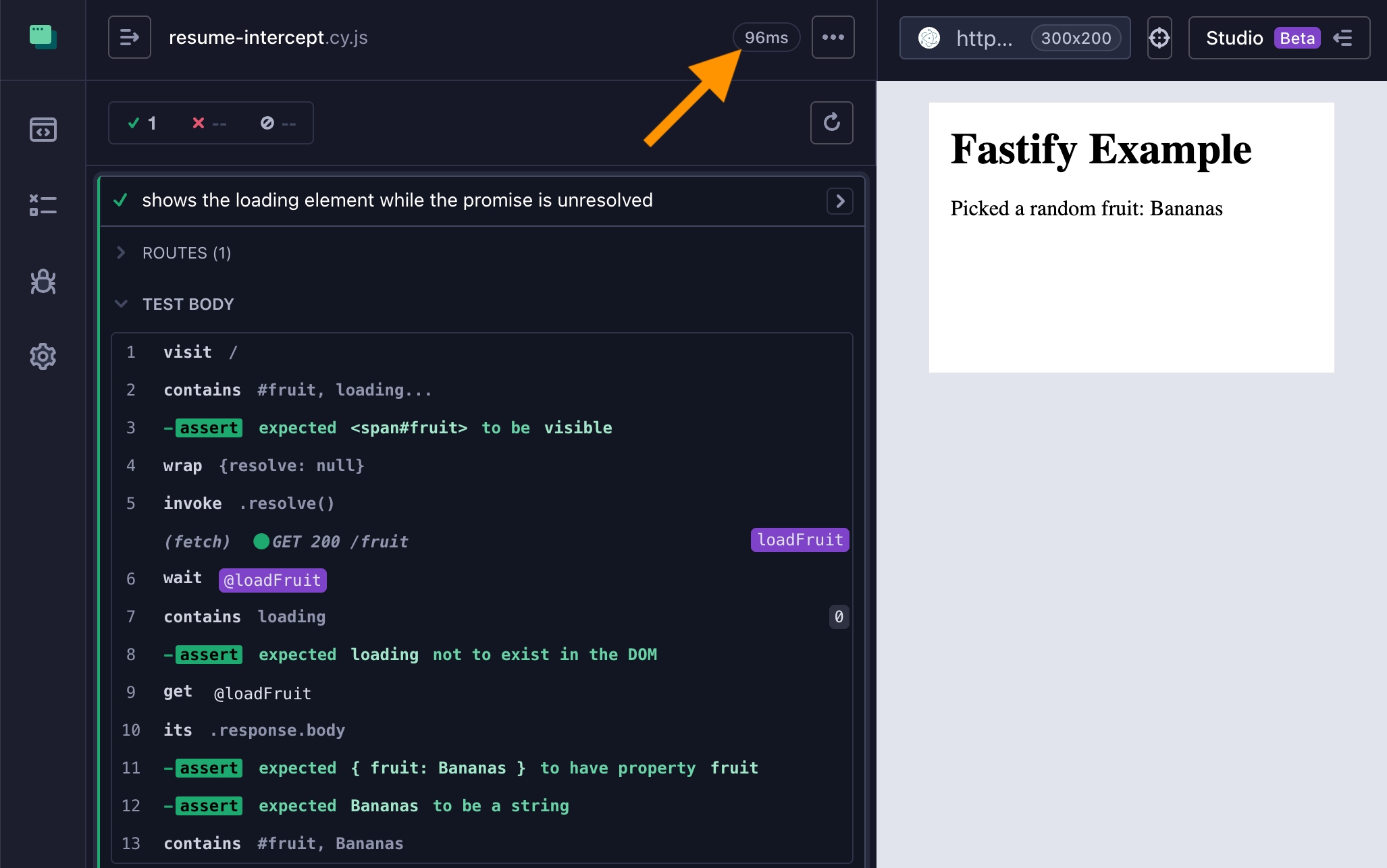
it('shows the loading element while the promise is unresolved', () => { // prepare an object to store the promise "resolve" function // the "resolve" function will be created once the network call is intercepted const networkDelay = { resolve: null } cy.intercept( 'GET', '/fruit', () => // delay the network call by returning a promise // and remembering its "resolve" function newCypress.Promise( (resolve) => (networkDelay.resolve = resolve), ), ).as('loadFruit') cy.visit('/') // confirm the loading element is visible after visiting the page cy.contains('#fruit', 'loading...').should('be.visible') // "unfreeze" the network call by resolving the promise // since "resolve" is a property of the networkDelay object, // we can invoke it to "unfreeze" the network call cy.wrap(networkDelay).invoke('resolve') // confirm the network call finishes cy.wait('@loadFruit') // and the loading element quickly goes away cy.contains('loading', { timeout: 100 }).should( 'not.exist', ) // confirm the right fruit is shown // since we already waited for the network call to finish, // we can use cy.get('@loadFruit') to access the intercepted request details cy.get('@loadFruit') .its('response.body') .should('have.property', 'fruit') .should('be.a', 'string') .then((fruit) => { cy.contains('#fruit', fruit) }) })
We use an object to store the "resolve" function
1
2
3
4
5
6
7
8
9
10
11
const networkDelay = { resolve: null }
// later inside the network call // delay the network call by returning a promise // and remembering its "resolve" function newCypress.Promise( (resolve) => (networkDelay.resolve = resolve), ),
// resume the network call by invoking a method cy.wrap(networkDelay).invoke('resolve')
The test is much faster: 96ms instead of 2 seconds
Reusable code
We can make a few custom commands to make freezing and resuming network calls easier. Just store the promises and resolutions under the aliases and have two custom commands
// what to do about previous frozen promise for this alias? // for now, let's resolve each previous promise, if any if (frozenPromises[atAlias]?.resolve) { frozenPromises[atAlias].resolve() }
cy.intercept(method, url, () => { // return the promise which delays the network call // until that promise is resolved return frozenPromises[atAlias].promise }).as(alias) })
Cypress.Commands.add('resume', (alias) => { if (!alias.startsWith('@')) { alias = `@${alias}` } const frozen = frozenPromises[alias] if (!frozen) { thrownewError( `No frozen promise found for alias ${alias}`, ) } cy.log(`Resuming network call for alias ${alias}`) frozen?.resolve?.() })
Here is the same test written using cy.freeze and cy.resume commands, including 2 second test wait
it('shows the loading element until we resume the network call', () => {
  // prepare for the network call "GET /fruit"
  // we will freeze it until we explicitly resume it
  cy.freeze('GET', '/fruit', 'loadFruit')
  cy.visit('/')
  // once the page loads, it makes the call
  // and we should see the loading element
  cy.contains('#fruit', 'loading...').should('be.visible')
  // confirm the network call "GET /fruit" is happening
  const baseUrl = Cypress.config('baseUrl')
  cy.get('@loadFruit')
    .its('request')
    .should('deep.include', {
      method: 'GET',
      url: `${baseUrl}/fruit`,
    })
  // still shows the loading element after 2 seconds
  cy.wait(2000)
  cy.contains('#fruit', 'loading...', {
    timeout: 0,
  }).should('be.visible')

  // once we resume the "GET /fruit" call
  // it should remove the "loading..." text really quickly
  cy.resume('@loadFruit')
  cy.contains('#fruit', 'loading...', {
    timeout: 100,
  }).should('not.exist')

  // confirm the right fruit is shown
  cy.wait('@loadFruit')
    .its('response.body')
    .should('have.property', 'fruit')
    .should('be.a', 'string')
    .then((fruit) => {
      cy.contains('#fruit', fruit)
    })
})
I find cy.freeze plus cy.resume a good combination for any network testing, especially for figuring out time-related or order-related problems with the web page. For more tips and examples, see my course Cypress Network Testing Exercises.