Branded Phone Type

Use TypeScript branded types to represent phone numbers in your tests.

In my previous blog post Branded Types I have shown a useful technique for representing time durations as "branded types" which removes the confusion between seconds and milliseconds.

1
2
3
4
// value is in seconds
const duration = 1
// oops, I thought the duration was in milliseconds
cy.wait(duration)

Let me show an other example: representing user phone numbers using branded types. This solves a common problem in end-to-end tests where the system has to verify the user to avoid scammers:

1
2
3
4
// are these numbers the same?
const phoneNumber1 = '+1 (123) 456-7890'
const phoneNumber2 = '1234567890'
const phoneNumber3 = '0001234567'

In our Mercari testing, we use type 2 and type 3 phone numbers to represent real and "dev-only" phone numbers. We want to distinguish these phone numbers from regular strings. We want to statically "catch" the problem of passing a string where a phone number is required

1
2
3
4
5
6
7
// custom command cy.enterPhoneNumber(phone: string)
// cannot check its argument, all it expects is a string

const phoneNumber = 'call me'

// oops, this is really wrong value to enter here
cy.enterPhoneNumber(phoneNumber)

Branded phone types

Let's represent the 10-digit phone numbers using branded types.

phone.d.ts
1
2
3
4
5
6
7
8
9
10
11
12
13
14
15
16
/**
* A branded type representing a phone number string.
*/
type PhoneNumber = string & { __brand: 'phone' }

//
// custom phone number types
//

type TestPhoneNumber = PhoneNumber & { __phoneKind: 'test' }
type RealPhoneNumber = PhoneNumber & { __phoneKind: 'real' }
/**
* A branded type representing a formatted phone number string.
* @example '(000) 000-0045'
*/
type FormattedPhoneNumber = PhoneNumber & { __phoneKind: 'formatted' }

I like using ambient .d.ts files so that the common types are available everywhere in the testing repo. Right now we have the common "base" type PhoneNumber that is different from a string, and it is further "subdivided" into TestPhoneNumber and a RealPhoneNumber. Different utils and objects can specify the phone number types needed.

phone.ts
1
2
3
4
5
6
7
8
9
10
11
// regular tests can use dev test numbers
export const generateTestPhoneNumber = () => {
const phoneNumber = '000' + Cypress._.random(1e6, 1e7 - 1).toString()
return phoneNumber as TestPhoneNumber
}

// when we need a number that can receive an SMS we can use
// an actual registered phone number
export const CONSTANTS = {
phoneNumber: '1234567890' as RealPhoneNumber,
}

Great, but if all we know is that we have a string, how do we ensure that it is a valid phone number? Well, we can check:

  • test phone numbers are 10-digit strings that start with "000"
  • real phone numbers are 10-digit strings that do not start with "000" or "555"
  • formatted phone numbers follow their own pattern

We can write TypeScript assertion functions for easy type casting:

phone.ts
1
2
3
4
5
6
7
8
9
10
11
12
13
14
15
16
17
18
19
20
21
22
23
24
25
26
27
28
29
30
31
32
33
34
35
36
37
38
39
40
41
42
/**
* Asserts that the given phone number is a valid test phone number,
* which starts with "000"
*
* @param phone The test phone number to validate
* @throws {Error} If the phone number is not a valid test phone number
*/
export function assertTestPhoneNumber(
phone: string,
): asserts phone is TestPhoneNumber {
if (typeof phone !== 'string') {
throw new Error(`Phone number must be a string. Got ${typeof phone}`)
}

if (!/^000\d{7}$/.test(phone)) {
throw new Error(`Invalid test phone number: ${phone}`)
}
}

/**
* Asserts that the given phone number is a valid real phone number,
* which is a 10-digit number that does not start with 0 or 555.
*/
export function assertRealPhoneNumber(
phone: string,
): asserts phone is RealPhoneNumber {
if (typeof phone !== 'string') {
throw new Error(`Phone number must be a string. Got ${typeof phone}`)
}

if (!/^\d{10}$/.test(phone)) {
throw new Error(`Invalid real phone number: ${phone}`)
}
// a real phone number cannot start with 0
if (phone.startsWith('0')) {
throw new Error(`Invalid real phone number: ${phone}`)
}
// a real phone number cannot start with 555
if (phone.startsWith('555')) {
throw new Error(`Invalid real phone number: ${phone}`)
}
}

The base phone number in our system is either a test phone number or a real phone number:

phone.ts
1
2
3
4
5
6
7
8
9
10
11
12
13
14
15
/**
* Confirms the given string is either a test phone number or a real phone number.
*
* @param phone The phone number to validate
* @throws {Error} If the phone number is neither a valid test phone number nor a valid real phone number
*/
export function assertPhoneNumber(
phone: string,
): asserts phone is TestPhoneNumber | RealPhoneNumber {
try {
assertTestPhoneNumber(phone)
} catch {
assertRealPhoneNumber(phone)
}
}

Here is how we can use it: imagine we have a string with a phone number.

1
2
3
const phoneNumber = '0001234567'
assertTestPhoneNumber(phoneNumber)
console.log(phoneNumber)

If we check the variable when it is declared, we see what TypeScript sees: a string
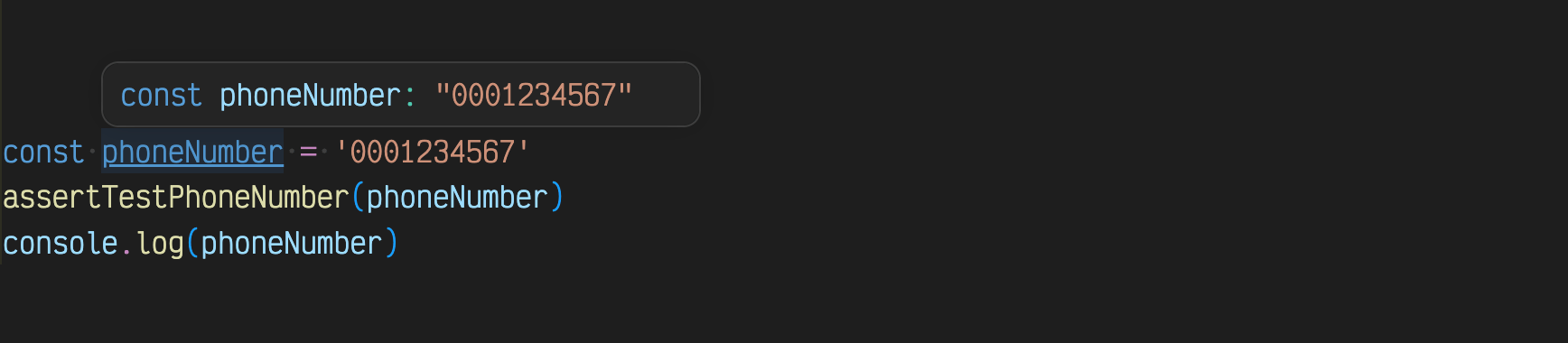
TypeScript: phoneNumber variable holds a string

We could be explicit and declare the variable type

1
const phoneNumber = '0001234567' as TestPhoneNumber

But we could assert the type by checking the string, then TS "knows" the current type, and the runtime validates it

1
2
const phoneNumber = '0001234567'
assertTestPhoneNumber(phoneNumber)

Look at the use of the variable phoneNumber after the assertTestPhoneNumber call:
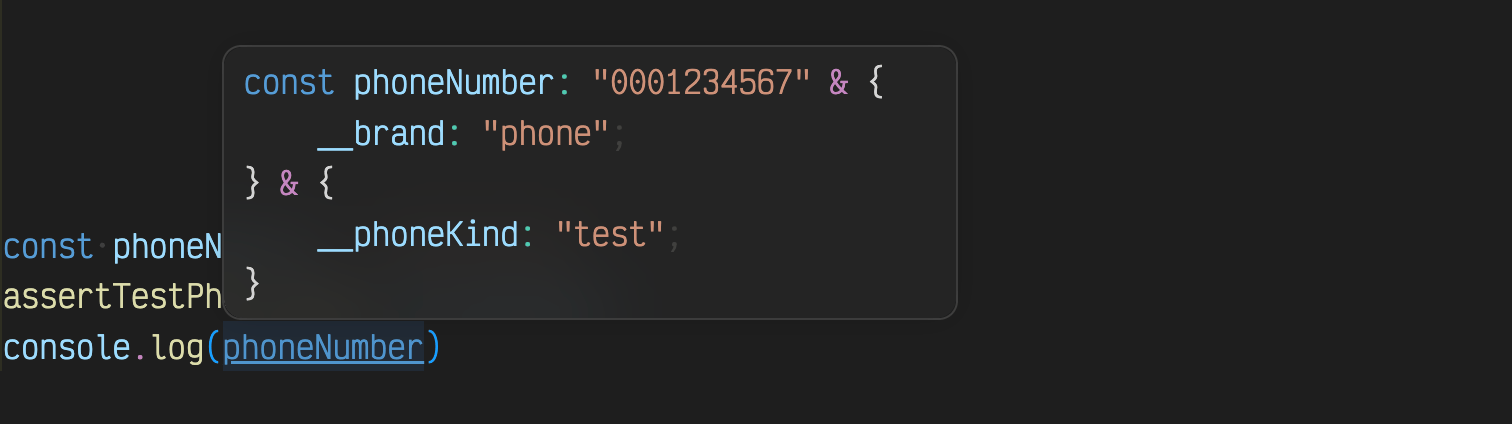
TypeScript: phoneNumber variable holds a test phone number

Beautiful. We can receive data from our backend and immediately cast it by validating

1
2
3
4
5
6
7
cy.request(...)
.its('data.phone')
.then(phone => {
// phone is "any"
assertTestPhoneNumber(phone)
// phone is "TestPhoneNumber"
})

There is no more confusion, the branded types let us statically check the variables. Yet every test and real phone number is also a string, so we can pass and use them, just like any string

1
2
3
4
5
6
7
8
cy.request(...)
.its('data.phone')
.then(phone => {
// phone is "any"
assertTestPhoneNumber(phone)
// phone is "TestPhoneNumber"
cy.get('#phone').type(phone)
})