Empty elements
📺 You can watch this recipe explained in the video Empty And Non-empty Elements On The Page
No children
Let's use CSS selector :empty to find empty DIV elements
<div>First</div>
<div>Second</div>
<div></div>
<div>Third</div>
<div>Fourth</div>
<div></div>
We have 6 HTML elements.
cy.get('*').should('have.length', 6)
cy.get(':empty').should('have.length', 2)
Let's find non-empty DIV elements
cy.get(':not(:empty)').should('have.length', 4)
Empty child
Even if there is a single empty child element, the element is not empty. For example, in the HTML below, the parent DIV in the <div><span></span></div> is NOT empty, while the SPAN is empty.
<div>First</div>
<div>Second</div>
<div><span></span></div>
<div>Third</div>
<div>Fourth</div>
<div></div>
We have 7 elements.
cy.get('*').should('have.length', 7)
The SPAN and the last DIV elements are empty
cy.get(':empty').should('have.length', 2)
All other elements are not empty
cy.get(':not(:empty)').should('have.length', 5)
Empty element assertion
An element without children can checked in two ways:
<div id="me"></div>
cy.get('#me')
  // an element without children
  .should('be.empty')
  // also matches CSS selector ":empty"
  .and('match', ':empty')
Whitespace with self-closing child
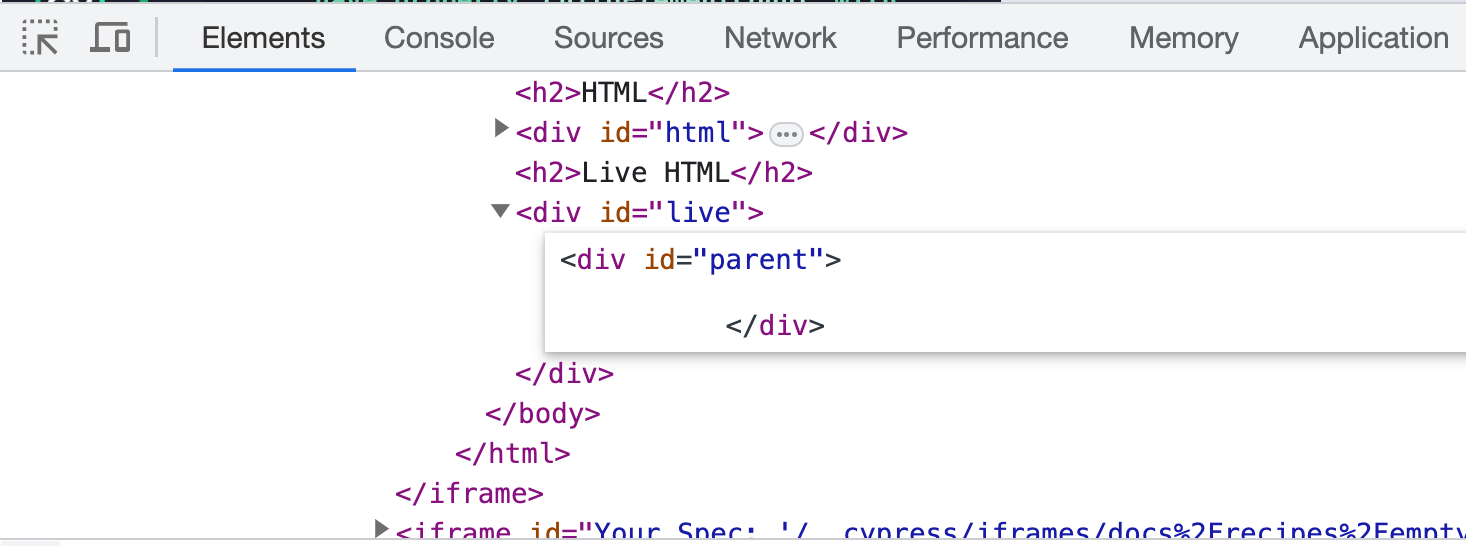
Notice that even though the parent element has no children (the child element is removed), it is still not empty.
<div id="parent"><div id="child" /></div>
document.getElementById('child').remove()
cy.get('#parent').should('not.be.empty')
The removed child element leaves empty space inside the parent HTML element.
Instead of checking completely empty element we can check its properties:
cy.get('#parent').should('have.prop', 'childElementCount', 0)
cy.get('#parent').should('have.prop', 'innerText', '')
Whitespace with closing tag child
This child element has the explicit closing tag <div id="child"></div>
<div id="parent"><div id="child"></div></div>
document.getElementById('child').remove()
Removing this element leaves no whitespace in the parent element.
cy.get('#parent')
  .should('be.empty')
  .and('have.prop', 'childElementCount', 0)
  .and('have.prop', 'innerText', '')
Double border
📺 Watch this recipe explained in the video Empty List Items Should Not Exist.
Empty elements might show up as a weird "double" border between elements with text. For example:
ul#items {
  list-style-type: none;
  margin-block-start: 0;
  margin-block-end: 0;
}
ul#items li {
  padding: 0;
  border: 1px solid gray;
}
<ul id="items">
  <li>One</li>
  <li></li>
  <li>Three</li>
</ul>
Since the second element is missing any text, but LI still renders, there is a "thick" border between the first and the last elements. We can confirm that there are empty elements using the following test:
// all element queries like cy.filter
// have a built-in existence assertion
cy.get('#items li').filter(':empty')
// the selectors can be merged into a single cy.get query
cy.get('#items li:empty')
We can prevent any empty elements using the explicit assertion
cy.get('#items li:empty').should('not.exist')
Alternatively, we can detect any elements with short height
cy.get('#items li')
  .filter((k, el) => {
    // "height" property returns a string like "1.52px"
    const height = parseInt(getComputedStyle(el).height)
    return height < 5
  })
  // only one element with suspiciously small height
  .should('have.length', 1)
Empty elements inside other elements
Sometimes we want to find all elements with empty elements inside. For example, our list of todo items should not have empty labels - each item should have some text. We cannot simply check the emptiness of the todo item element - since there are checkboxes and some other HTML elements with contents. We are only interested in empty <LABEL> elements.
#todos {
  li {
    list-style-type: none;
    min-height: 2em;
    line-height: 2em;
    border: 1px solid grey;
    padding-left: 1em;
    input[type='checkbox'] {
      margin-right: 1em;
    }
  }
}
<ul id="todos">
  <li id="1">
    <input type="checkbox" /><label>Clean room</label>
  </li>
  <li id="2">
    <input type="checkbox" /><label>Brush teeth</label>
  </li>
  <li id="3"><input type="checkbox" /><label></label></li>
  <li id="4">
    <input type="checkbox" /><label>Prepare dinner</label>
  </li>
</ul>
The app shows a list of chores, but one of the items has no text! None of <LI> elements is empty, as the next command proves.
cy.get('#todos li:empty').should('not.exist')
Instead we can detect <LI> elements that contain children <LABEL> elements that are empty
// a single LI element with an empty label inside
cy.get('#todos li:has(label:empty)')
  .should('have.length', 1)
  // confirm we found the right LI element
  .and('have.attr', 'id', '3')
  // or we can check the index of the found LI element
  // amongst all LI siblings
  .invoke('index')
  // indices start with 0
  .should('equal', 2)
Note: jQuery pseudo-selector :contains(text) does not work well with empty strings, since :contains returns partial matches. Thus it works the best for non-empty strings.
cy.get('#todos li:has(label:contains("dinner"))').should(
  'have.attr',
  'id',
  '4',
)
Let's find all <LI> elements with non-empty <LABEL> elements inside
cy.get('#todos li:has(label:not(:empty))')
  .should('have.length', 3)
  // confirm we found the right LI elements
  // by looking at their IDs
  .mapInvoke('getAttribute', 'id')
  .should('deep.equal', ['1', '2', '4'])
Note: the query command mapInvoke comes from cypress-map plugin.